GainStage Editorial may earn a sales commission when you buy through our audio gear links, at no additional cost to you. How GainStage Editorial earns affiliate revenue
A USB condenser microphone combines three pieces of gear into a single cylinder: an electrostatic capsule, an analog preamplifier, and an analog-to-digital converter (ADC). For home recordists, streamers, and podcasters, that integration eliminates the external audio interface, XLR snakes, and dedicated phantom power supplies. You plug directly into a computer or compatible mobile device and start recording immediately.
However, simplicity comes with acoustic trade-offs. Condenser capsules are extremely sensitive and feature fast transient response. In an untreated bedroom, that sensitivity means they register computer fan hum, street traffic, and bare-wall slapback just as easily as vocal nuances. As sound engineers emphasize in MicScore's USB setup guide, the physical room and mic placement dictate capture quality far more than software post-processing. Before purchasing, understanding physical controls, mechanical mounting, and direct monitoring capabilities is essential.
- Mechanical Decoupling: Desk stands pick up mechanical vibrations from typing and tapping. Boom arms and shock mounts decouple the capsule from working surfaces.
- Physical Controls: Dedicated analog input gain dials and tactile mute buttons allow immediate adjustments without opening OS mixer windows.
- Hardware Monitoring: An integrated 3.5 mm headphone output enables direct, zero-latency monitoring to prevent distracting processing delays.
- Capsule Directionality: A cardioid polar pattern isolates the voice from the front while rejecting ambient room reflections from the rear.
Entry-Level USB Condenser Kits Under Review
Budget USB condenser packages frequently target streaming and desktop voiceover with all-in-one hardware bundles. The options below range from boom-arm studio kits to compact tripod desktop mics, based on marketplace listings and technical specifications.
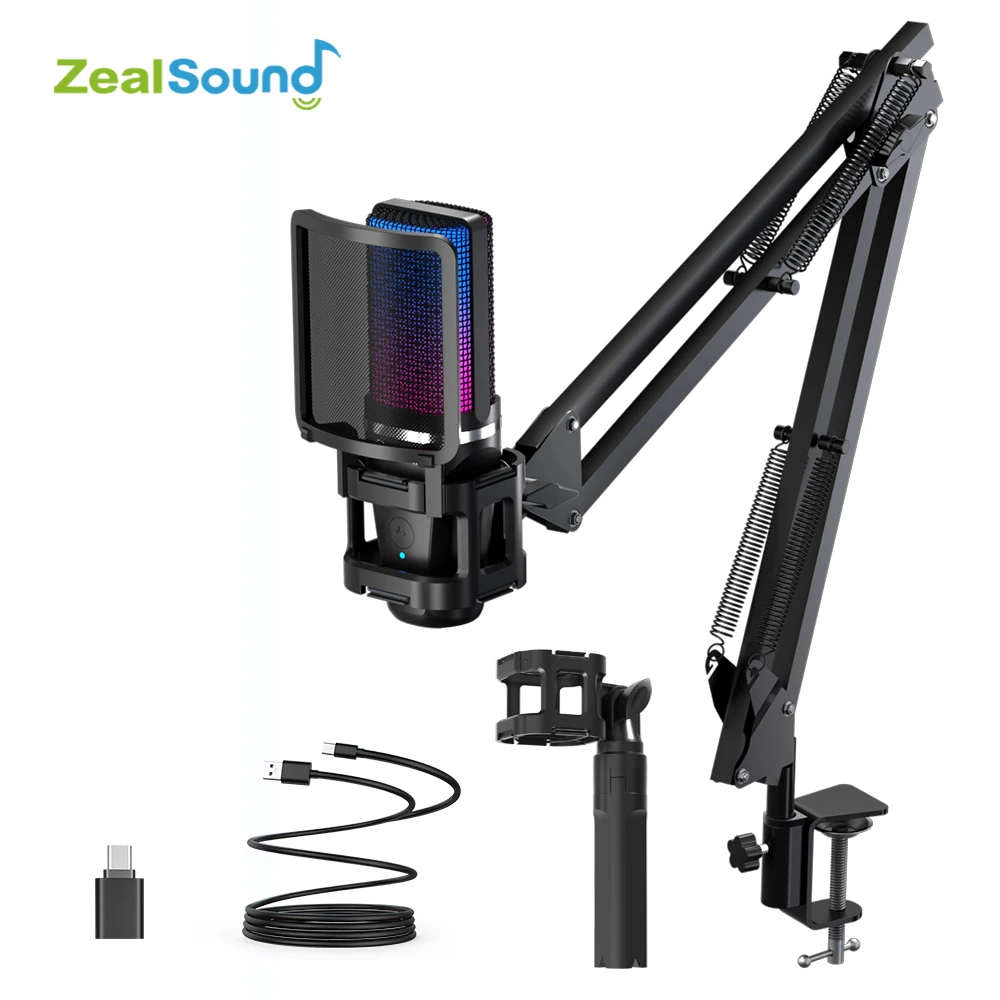
1. Zealsound RGB USB Condenser Kit
The Zealsound kit is listed as a multi-mount USB condenser setup aimed at gaming, podcasting, and streaming. Listing images show both an articulated suspension arm and a desktop tripod stand, paired with an integrated shock mount and a mesh pop filter. This hybrid mounting approach gives you the flexibility to mount the mic over an uncluttered desktop or pack it down for portable recording.
- Mounting versatility: Listed with both a desk-clamp boom arm and a compact tripod.
- Acoustic plosive control: Visual references indicate an included pop shield to mitigate hard vocal bursts ("p" and "b" sounds).
- Buyer note: Confirm with the seller whether both the boom arm and desk tripod arrive in the exact chosen bundle variant.

2. Haomuren Professional USB Cardioid Studio Kit
The Haomuren kit bundles a cardioid condenser mic with an articulated scissor-arm boom, a foam windscreen, and a dedicated desk clamp. A major functional highlight visible on the chassis is a cluster of physical rotary dials, including dedicated mic gain and a headphone volume output, alongside a tactile mute button.
- Front-panel hardware control: Rotary dials allow immediate gain staging without relying on operating system software sliders.
- Vibration rejection: Suspending the mic on an articulated arm clears footprint space and prevents typing thumps from entering the capsule.
- Buyer note: Review the listing closely to ensure the clamp width matches your desk thickness; check our guide to studio desks for recording and mixing for clearance considerations.

3. AmpliGame by FIFINE A2 Condenser Microphone
The FIFINE AmpliGame A2 is a dedicated compact condenser mic tailored for desktop streaming and Discord communication. According to the FIFINE AmpliGame A2 user manual, it features a 16 mm cardioid condenser capsule, integrated elastic shock mount, quick tap-to-mute sensor, and a desktop tripod stand. It connects via USB-C to USB-A/C and draws direct 5V bus power without drivers.
- Direct tap-to-mute: Top-mounted touch sensor allows silent muting without mechanical clicking sounds in the feed.
- Compact footprint: Sits directly on your workstation on a tripod, best suited for tidy desks where arm clamps are impractical.
- Buyer note: Tripod desktop mounts transfer keyboard and mouse impact vibrations directly; consider upgrading to a separate boom arm if desk rumble is audible.

4. Haomuren USB Desktop Microphone with Phone Adapter
This standalone Haomuren model features a heavy cast desktop cradle and includes mobile adapter connectivity alongside its PC/Mac compatibility. Listing claims highlight an integrated 3.5 mm headphone output for local monitoring, rotary gain adjustment, and mobile device support.
- Multi-device support: Advertised with phone adapters for creators who record voice memos, interviews, or mobile streams.
- Direct monitoring: A physical 3.5 mm jack lets you listen to your incoming audio without driver latency.
- Buyer note: Desktop stands sit low; ensure you can elevate the mic capsule close enough to your mouth to maintain optimal signal-to-noise ratio.
| Model | Included Mount | Physical Controls | Monitoring Jack | Primary Suitability |
|---|---|---|---|---|
| Zealsound RGB Kit | Boom Arm & Tripod | Mute button stated | Not verified | Podcasting, flexible streaming setup |
| Haomuren Cardioid Kit | Articulated Boom Arm | Mic Gain, Echo, Mute | 3.5 mm Jack visible | Voiceovers, home recording on a desk clamp |
| FIFINE AmpliGame A2 | Tripod & Shock Mount | Tap-to-mute sensor | Not verified | Compact gaming setups, Discord dialogue |
| Haomuren Desktop USB | Desktop Stand Cradle | Mic Gain, Mute, Echo | 3.5 mm Jack stated | Mobile recording, basic PC voice tracking |
Dialing In Your USB Condenser: Step-by-Step Setup
Because USB microphones bypass dedicated preamps, your digital gain staging and physical positioning determine whether your takes sound clear or cluttered. Audio setup guidelines from SonusGearFlow and workflow principles from Hollyland's microphone guides highlight key setup steps:
- Capsule Positioning: Keep your mouth 4 to 8 inches away from the front of the capsule. Position the microphone slightly off-axis (around 15 to 20 degrees) to prevent vocal plosives from hitting the diaphragm head-on.
- OS Recognition: Connect directly to an onboard USB port rather than an unpowered hub. In your system sound panel (Windows Sound Settings or macOS Audio MIDI Setup), confirm the device is designated as your default recording device at 24-bit or 16-bit, 48 kHz.
- Proper Gain Staging: Never compensate for distance by maxing out software gain, which raises ambient room floor noise. Set the microphone's physical hardware gain so vocal peaks register between -18 dBFS and -12 dBFS in your recording software. This provides clean digital headroom without risking harsh digital clipping.
- Monitoring Configuration: Connect closed-back headphones to the mic’s 3.5 mm jack if available. Avoid open-back headphones or desktop monitor speakers while tracking, as acoustic bleed can leak back into the sensitive condenser capsule.
The Bottom Line
For home creators seeking an uncomplicated recording workflow without an external audio interface, a USB condenser microphone provides an accessible starting point. If you work from a desk with keyboard activity, select a kit bundled with a boom arm—such as the Haomuren Studio Kit or the Zealsound RGB Kit—to decouple mechanical vibrations. If workspace is limited and quick muting is your priority, compact desktop units like the FIFINE AmpliGame A2 provide a tidy, plug-and-play solution.